// an AI-native Git client for GitHub, GitLab & Bitbucket
The whole loop,
one window.
Everything GitHub Desktop does (staging, branches, diffs, history, sync), now across GitHub, GitLab & Bitbucket, with the full pull-request loop, CI, and issues in one window. Then AI that reads your diff for commits, PR descriptions, and code review — and takes on whole delegated tasks — on your own models, or hidden entirely.
Windows, macOS & Linux · Apache-2.0 ·
// a calm, native Git client for GitHub, GitLab & Bitbucket
The whole loop,
one window.
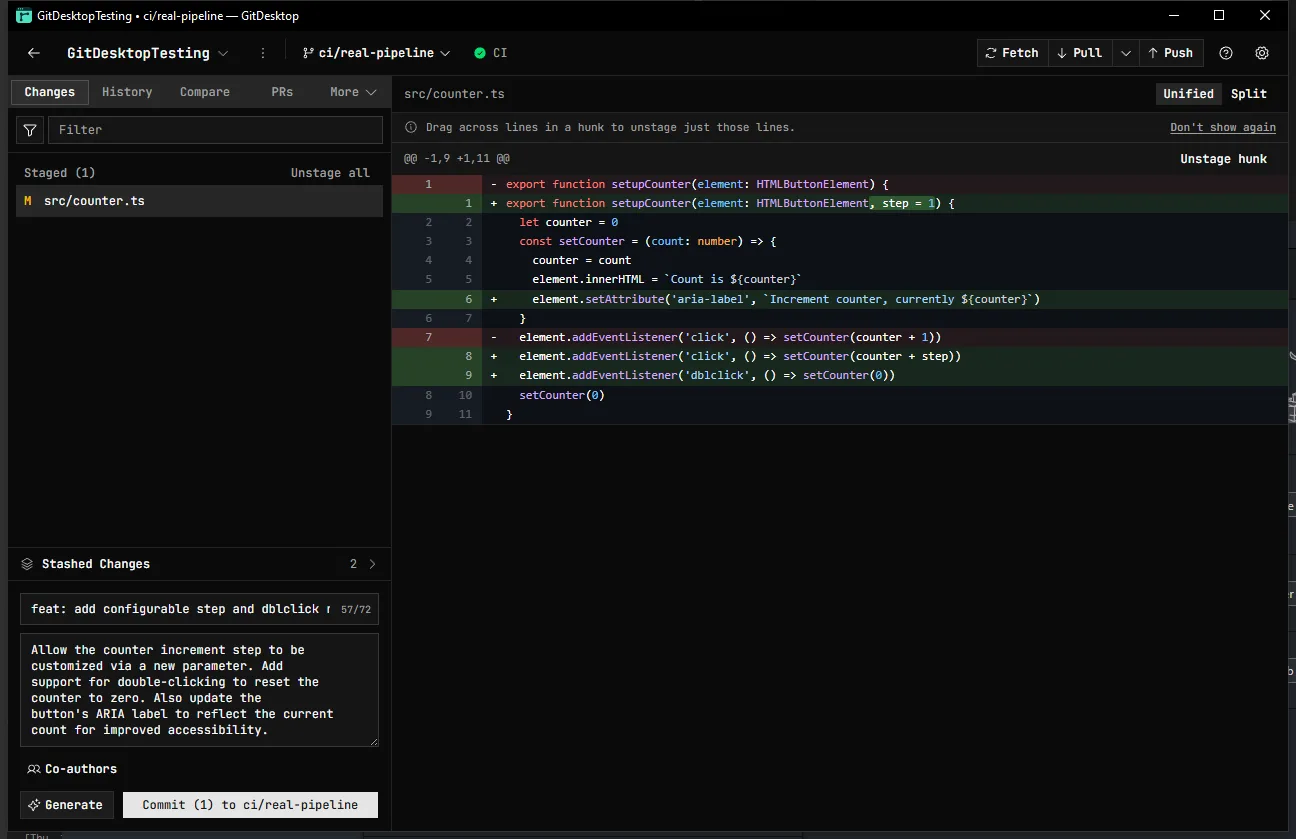
Everything you expect from GitHub Desktop — staging, branches, diffs, history, sync — now across GitHub, GitLab & Bitbucket, with the full pull-request loop, CI, issues, and branch protection in one fast native window. Built to be trusted with uncommitted work. No AI in sight.
Windows, macOS & Linux · Apache-2.0 ·
It writes the commit.
You keep the keys.
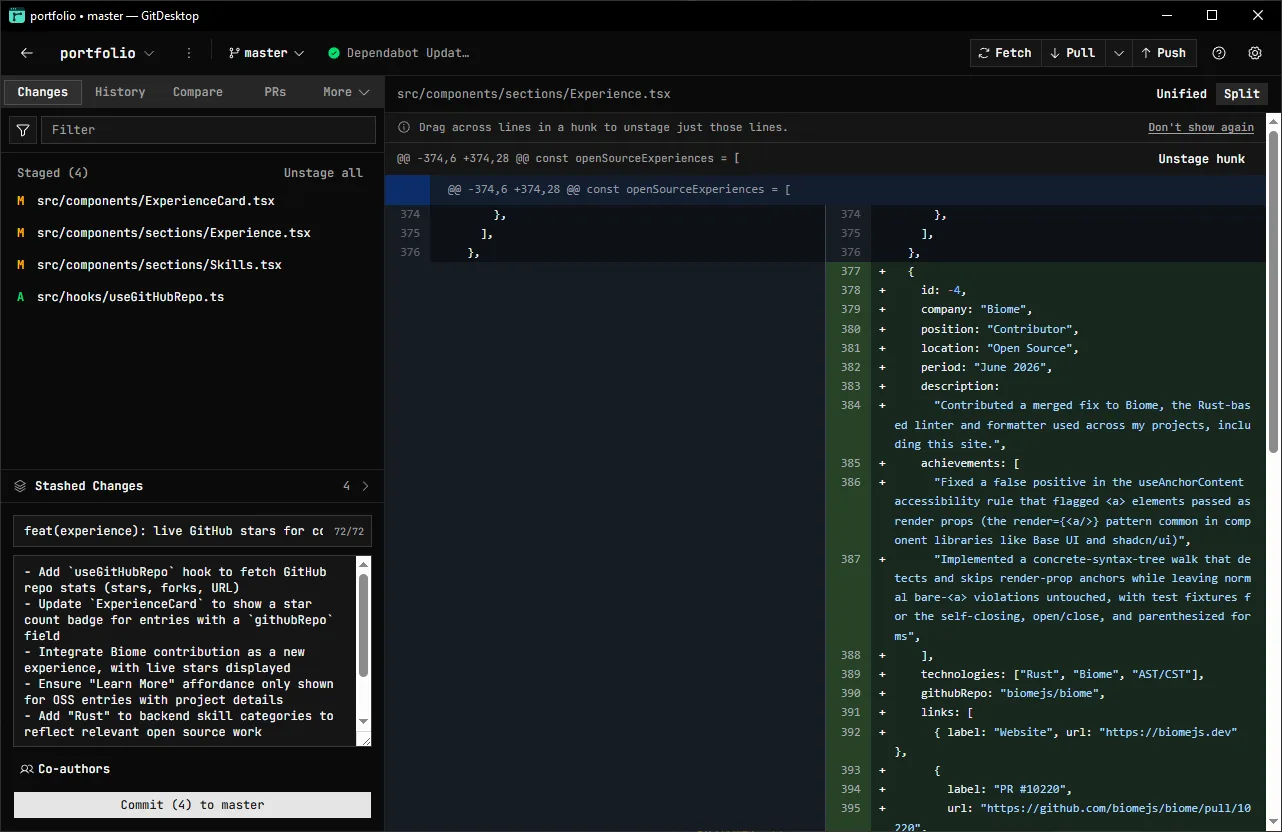
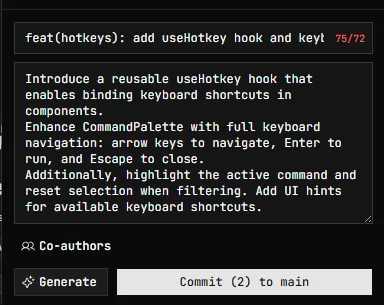
One click reads your staged diff and drafts the commit message — and the PR title and description — in your conventions. It streams into the same fields you'd type in, so it's always editable and never blocks the manual path. Generating a PR description can also propose which of your open issues it Closes or relates to, chosen from a grounded shortlist so it never invents an issue number — or, on a Bitbucket repo with a linked Jira project, which linked-Jira tickets to mention.
Bring your own model: Anthropic, OpenAI, any OpenAI-compatible endpoint, OpenRouter, Ollama (local, LAN, or cloud), or your Claude / Codex / Copilot / opencode CLI. No keys go to us — they're yours, in your OS keychain.
Hand off a task. Watch every step.
Delegate a coding task to a Claude, Codex, Copilot, or opencode agent — it works in an isolated worktree, so your own checkout is never touched. Follow every file it reads and edits, expand any edit to its diff inline, then keep it as a branch, open a local PR from it, or discard it.
Run several at once, or fan one task across models with best-of-N and keep the winner. Each session has an integrated terminal, and can be sandboxed in a Docker or Podman container.
-
Read
src/auth/session.ts· read -
Searched
"redirectTo"— 4 matches · search -
Edited
src/auth/callback.ts· edit -
Run
pnpm test auth· terminal
A reviewer that actually reads the code.
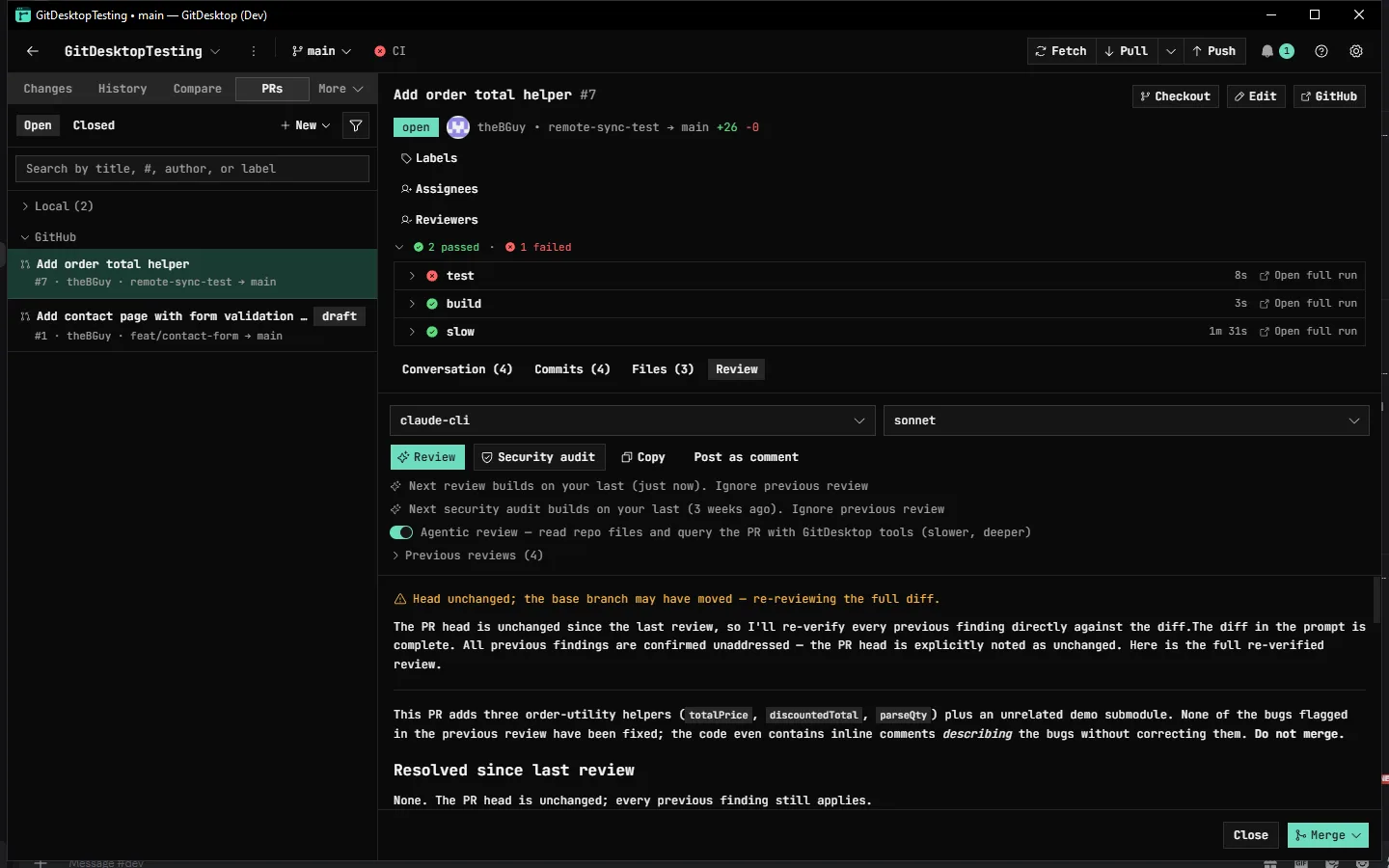
Run a general review or a security audit on any pull request — local or on GitHub, GitLab, or Bitbucket. It reads the changed files, flags real issues with a severity, and cites the exact lines. The result stays on your machine unless you choose to post it — and it keeps running while you move between PRs, or even after you close the window, then pings you when it's done.
Turn on Agentic review and the reviewer pulls the full diff past the prompt budget, reads any file at any ref, searches the repo, and runs history — read-only end to end, so it explores but never modifies. Re-runs remember the last round and fold in Copilot's and CodeRabbit's findings instead of repeating them.
Your forge. Not just GitHub.
One calm client for all three. GitDesktop routes every pull-request and CI action through a forge abstraction, so the same panels work whether your remote points at GitHub, GitLab, or Bitbucket — each on its own authenticated identity, none borrowing another's. Sign in and reconnect to GitHub and GitLab without leaving the app; GitDesktop spots an expired session, badges the account, and warns before a token lapses.
- GitHub
PRs, Actions, issues, discussions, admin — via gh
- GitLab
MRs, pipelines, releases, project settings — via glab
- Bitbucket
PRs, Pipelines, repo settings — Atlassian token
On a GitHub fork, a Fork | Upstream switch aims the whole Pull Requests and Issues surface at either your fork or the parent repository, remembered per repo, so you work your own PRs or the upstream's without re-cloning.
GitHub & GitLab go through their CLIs (gh,
glab) — including GitHub Enterprise and
self-managed GitLab; Bitbucket Cloud uses an Atlassian API token. A few things
differ by platform, and we say so where they do.
Your tracker, linked in.
Link a Jira Cloud project to any repository and the Issues tab gains a Jira section: browse and filter your issues, read status, type, priority, assignee, description and comments — plus agile fields like story points, sprint, and a clickable epic when the project uses them. Create, comment, assign, set a due date, change priority, edit labels, and close or reopen along the project's own workflow — every action gated on your Jira permissions.
Especially handy for Bitbucket, whose native tracker Atlassian retires in August 2026.
referenced Jira issues
Issue keys are spotted in your branch name, commit messages, and PR titles, then linked straight back to the issue in the Issues tab.
PROJ-142 · Redirect loops on SSO login
In Progress· Bug· 5 points· Sprint 24
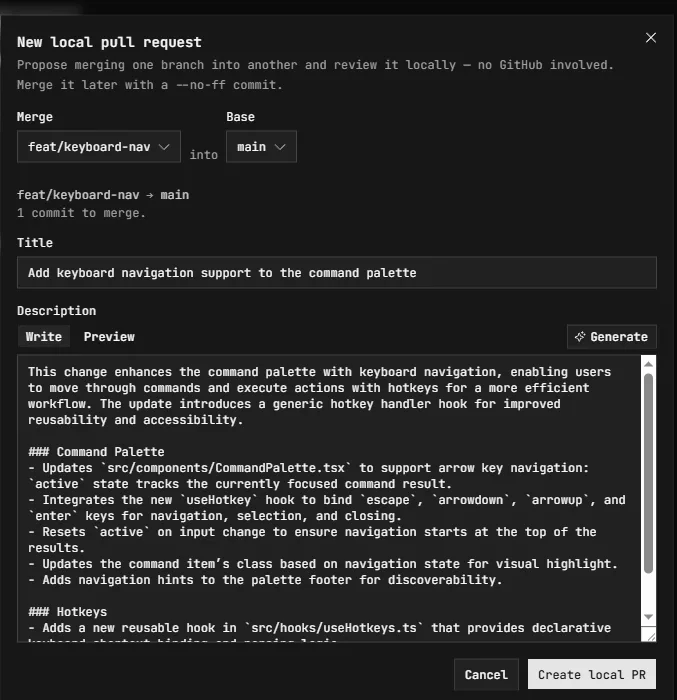
Pull requests. Without the browser — or the cloud.
Open pull requests on GitHub, GitLab, and Bitbucket, or private
local PRs that never leave your machine: propose a
merge, review the diff, and merge with a --no-ff
commit — on a repo that isn't on any forge at all.
A local-PR merge pre-shows whether it will conflict, and if it does you resolve it in an isolated worktree that never touches your branch — then Finish or Abort. Promote a local PR to a real GitHub PR, comments and all, in one click.
Watch CI without a browser tab.
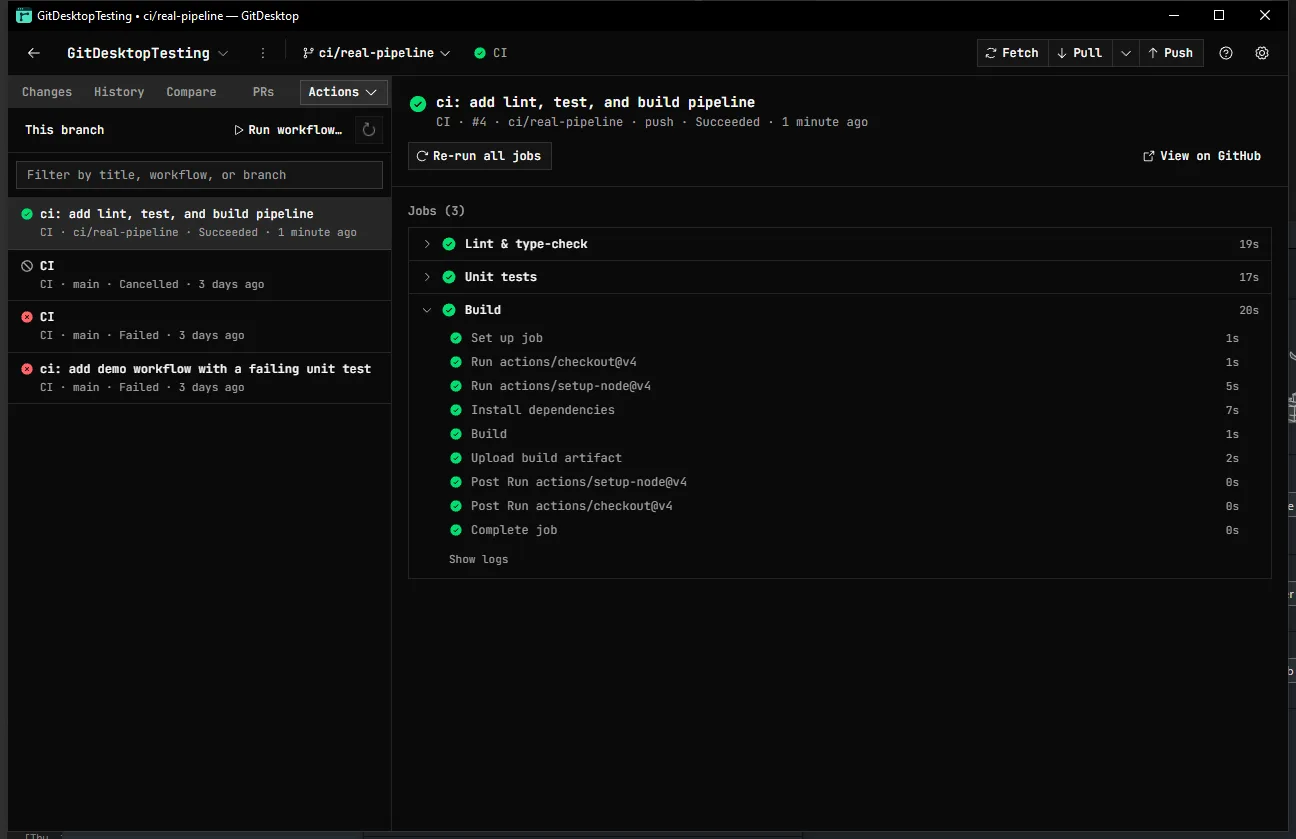
GitHub Actions, in the app — browse runs for the current branch, drill into jobs and steps, dispatch a workflow, and re-run or cancel. A PR's checks collapse into a pass/fail/pending/skipped rollup that shows a running check's current step live and peeks a failing job's log inline.
GitLab pipelines get the same inline-log treatment; Bitbucket build statuses link out. Insights charts CI durations alongside your local-git analytics.
Issues and to-dos, triaged in place.
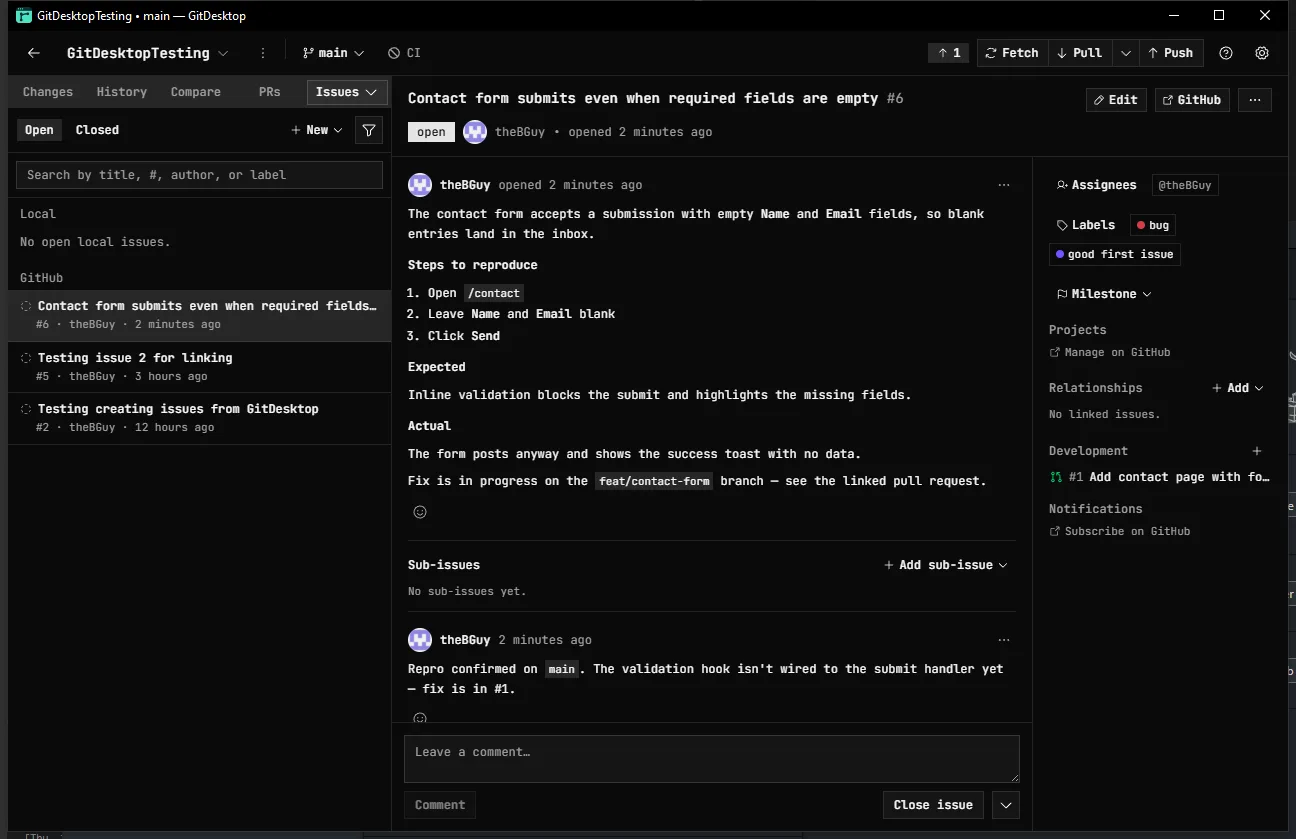
Browse, open, and edit GitHub and GitLab issues without the tab-switch. Labels, assignees, milestones, issue type, sub-issues, dependencies, and the pull requests and branches that close them all sit in one panel.
A Code TODOs tab scans your working tree for
TODO, FIXME, and
HACK comments, blames each to the commit that
introduced it, and turns any one into a local issue.
Working privately? Keep plain local to-dos that need no remote, then publish them to GitHub or promote them to Jira when the work goes public.
Discussions, where the thread lives.
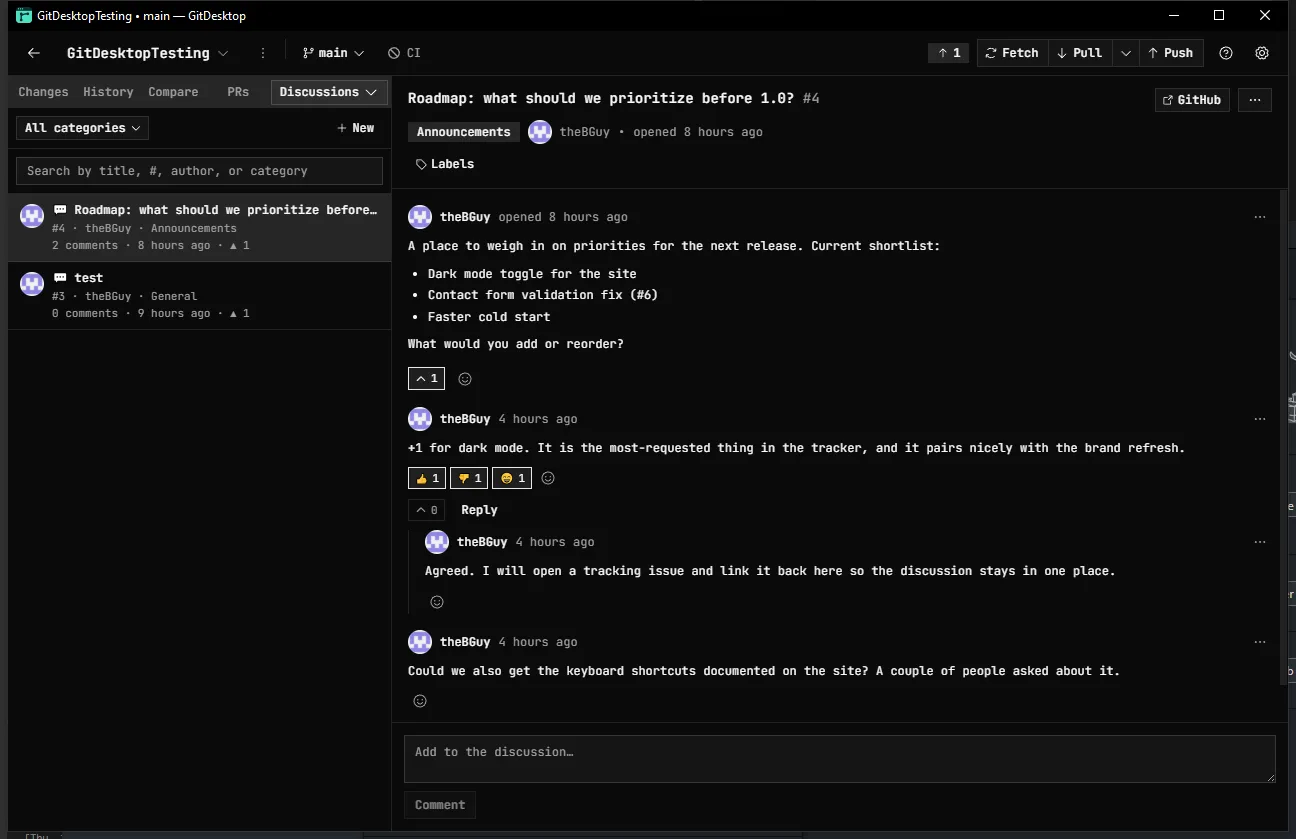
Read and join your repository's GitHub Discussions in the same window: categories, upvotes, reactions, and threaded replies, with the Write/Preview markdown you author everywhere else.
Announcements, Q&A, and roadmap threads, no browser tab required.
And the rest of the daily loop.
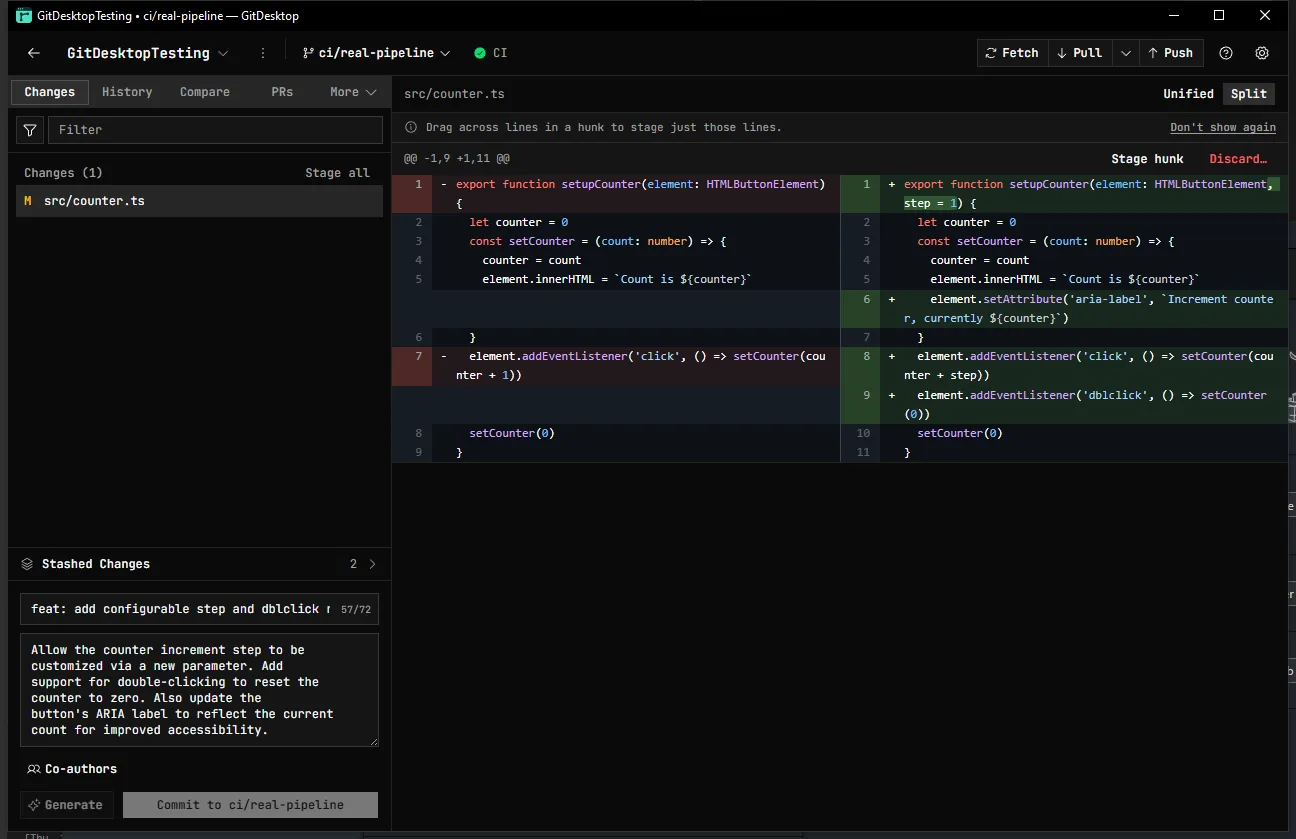
Stage exactly what you mean.
Stage — or discard — by file, by hunk, or by dragging across individual
lines, even within a brand-new file, to split a messy working tree into
clean, reviewable commits, with partial patches applied via git's own
--cached.
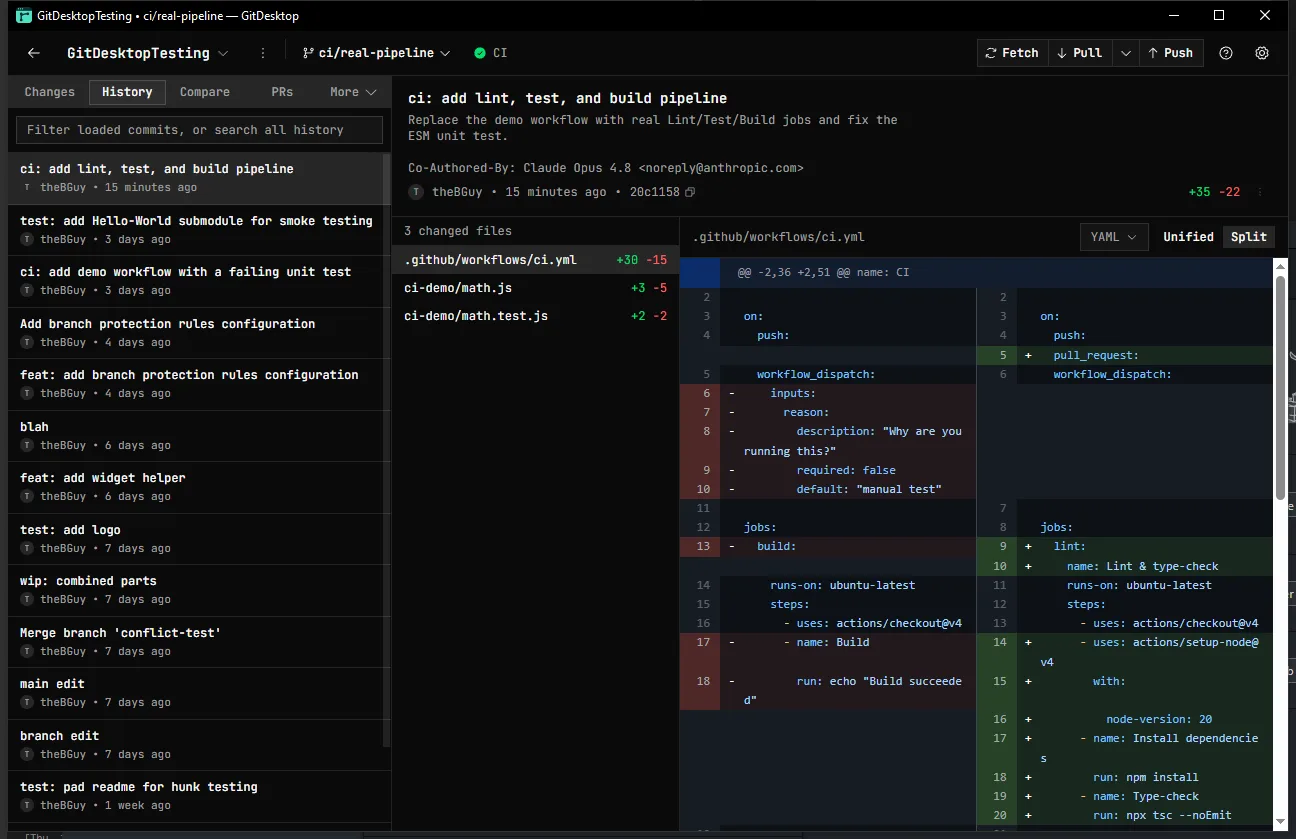
Read the whole story.
Browse history, search every commit, and blame any line back to the change that introduced it — then cherry-pick, squash, reorder, or stash, without leaving the keyboard.
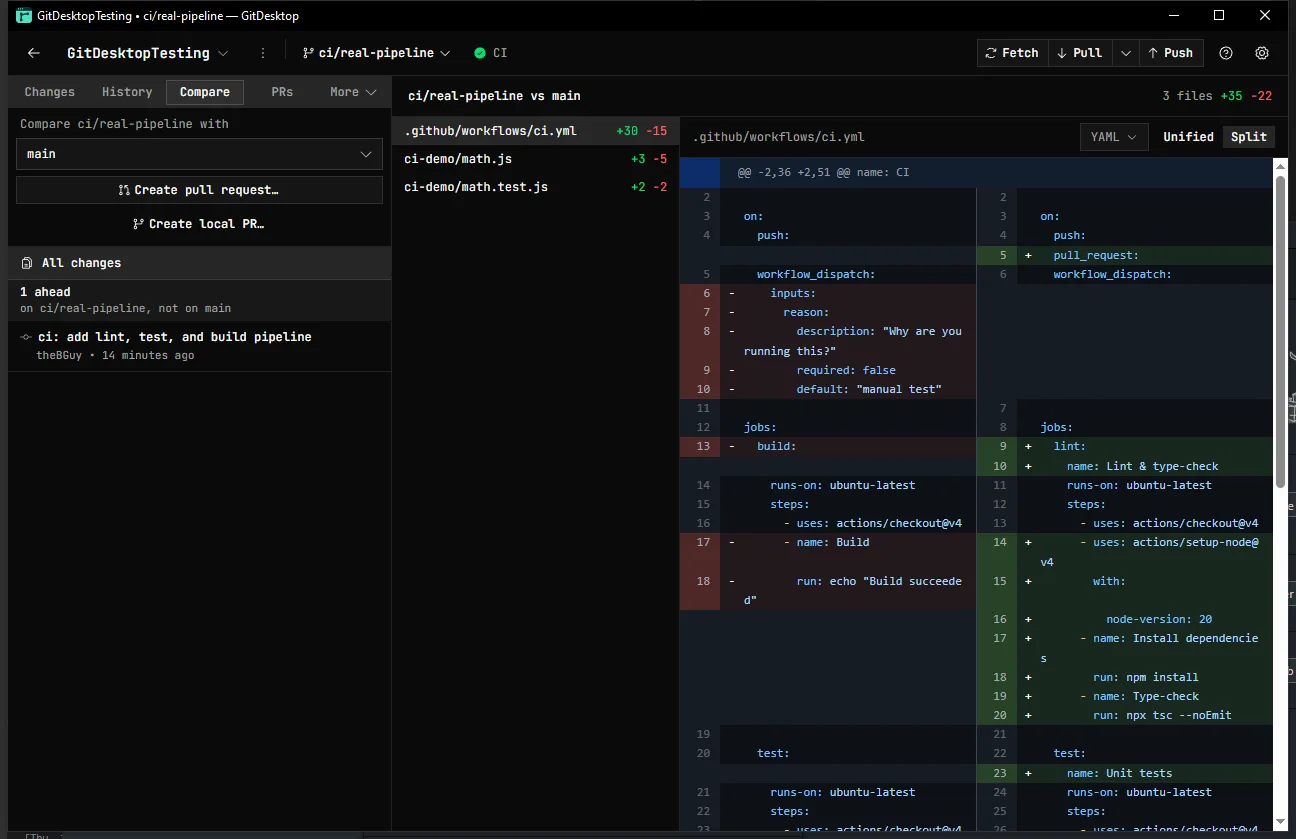
Compare anything.
Compare any branch against another — ahead/behind counts, a three-dot diff, the full list of changed files, and every commit that isn't on the base yet.
Merging shows an advanced tooling panel that predicts the result in memory — fast-forward, clean, or which files will conflict — before you commit to it.
Built to be trusted with uncommitted work.
The whole point of a client you keep open all day is that it never surprises you on a destructive path. GitDesktop keeps a way back from every risky move.
Discards you can undo.
Discarded changes and deleted untracked files go to the recycle bin, not the void.
--force-with-lease by default.
Divergence routes to a guarded force push that can't clobber a teammate's
work; pull is --ff-only.
An operation journal.
Risky compound ops — merges, cherry-picks, rebases, history edits — are recorded, so an interrupted one surfaces a calm recovery notice with the exact state it started from.
Recover lost work.
A git fsck scan finds orphaned stashes that
fell off the list and restores them non-destructively.
Or point an agent at GitDesktop.
The reverse direction: run GitDesktop as an MCP
server and any external client — Claude Desktop, Cursor, Claude Code —
can understand a repo through read-only git, PR & CI tools, across GitHub,
GitLab, and Bitbucket. Settings writes the config into your repo's
.mcp.json or installs it globally.
Writes are an escalating opt-in ladder — each tier a separate flag, off by default, so read-only stays the default.
- default Read-only — status, log, diff, blame, PRs, issues, CI
- --allow-write Local PRs & issues (GitDesktop's own review artifacts)
- --allow-remote-write Real forge writes under your authenticated identity
- --allow-git-write Recoverable git ops — stage, commit, branch, push
- --allow-destructive The irreversible ones — discard, reset, force-push
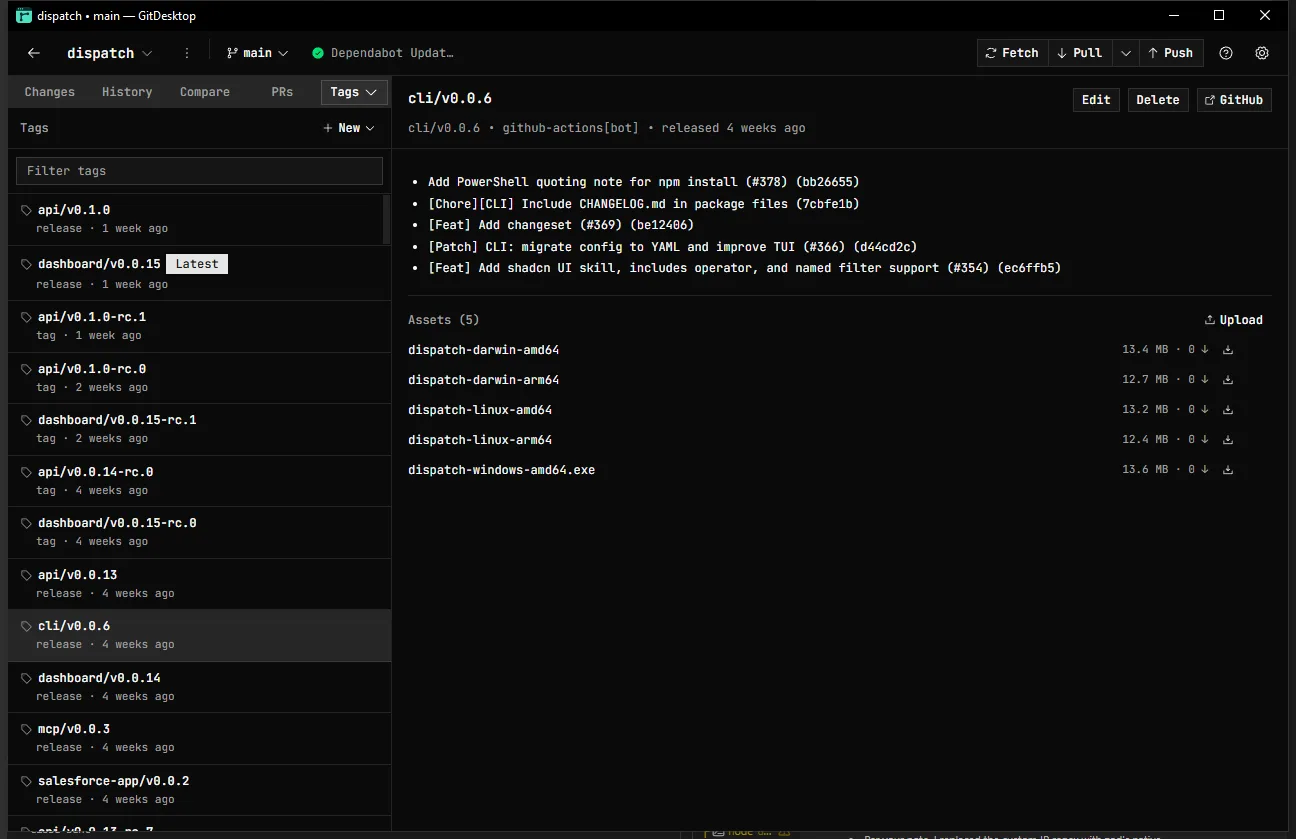
Cut a release without the dashboard.
Every tag and release in one panel. Cut a new one without the browser: write the notes, mark it latest, pre-release, or draft, and attach the cross-platform binaries.
Lightweight tags for a quick checkpoint; full releases when you ship — push, edit, delete, or download any asset, in the app.
// everything else you'd reach for
See all features →- Branch compare — ahead/behind, three-dot diff, jump to PR
- Clean up branches in bulk — archive or delete stale ones in one sweep
- Interactive rebase — reword / squash / fixup / edit / drop / reorder, atomic replay
- Merge preview — fast-forward / clean / which files conflict, before you merge
- Recover lost work — git fsck for orphaned stashes, restored non-destructively
- GitHub PRs + private, offline local PRs
- Inline review comments — reply, resolve, apply suggestions locally
- GitHub, GitLab & Bitbucket — first-class, each on its own identity
- Jira Cloud — link a project, browse & work issues in-app
- Code TODOs — scan TODO/FIXME/HACK comments, jump to blame, promote to an issue
- GitHub Actions — runs, jobs, steps, re-run, cancel & dispatch
- Worktree manager — create, switch, promote & remove
- Tasks — register a repo script or write one inline, run it in an interactive terminal
- Auto-fetch — quiet background sync, never auto-pulls
- Activity & notifications inbox — never miss a finished review or check
- Command palette + rebindable keys
- Markdown editor — formatting toolbar & live preview
- Generated commit messages, PR & issue titles/descriptions
- AI code review & security audit on any PR
- Delegate a task to a Claude, Codex, Copilot or opencode agent
- Use GitDesktop as an MCP server — read-only default, opt-in write ladder
Keep it open all day.
Free, open source, and native. Fast enough to live in, careful enough to trust
with your work — discards are recoverable and pushes use
--force-with-lease.
Windows, macOS & Linux